How to Choose the Best Tactile Push Button for Your Project?
In the world of electronic components, the Tactile Push Button stands out as a key interface element. According to a recent market research report, the demand for tactile switches, including push buttons, is projected to grow at a CAGR of 4.3% from 2022 to 2028. This growth highlights the increasing reliance on intuitive user interfaces across various applications. Industries such as consumer electronics, automotive, and medical equipment are driving this trend, emphasizing the need for precise tactile feedback and durability.
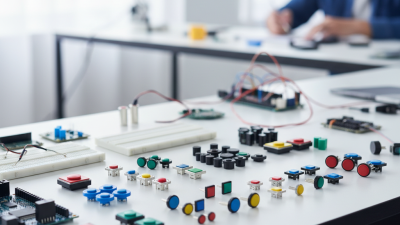
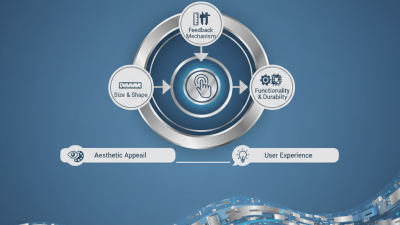
Choosing the right Tactile Push Button involves considering several factors. Key aspects include actuator force, electrical specifications, and environmental considerations. Data from industry experts reveal that a mismatch in these attributes can lead to performance issues and user dissatisfaction. Thus, making an informed choice is vital for project success. Engineers and designers must evaluate their specific requirements carefully and consider the long-term implications of their selection.
While many options exist, not all Tactile Push Buttons are created equal. Some may offer exceptional tactile feedback but lack longevity, while others excel in durability at the expense of a satisfying user experience. This balancing act requires careful thought and an openness to reassess choices as project parameters evolve. Professionals must remain diligent in making selections that align with both current needs and future expectations in technology.
Understanding Tactile Push Buttons: Key Specifications to Consider
When selecting tactile push buttons, understanding their specifications is crucial. Tactile push buttons are available in various types, including momentary and latching options. The choice largely depends on how you want the button to behave in your project. For instance, momentary buttons return to their original state when released, while latching buttons remain in the last position until pressed again.
Another key specification to consider is the actuation force. This indicates how much pressure is needed to activate the button. A higher actuation force might suit applications requiring minimal accidental activation. Conversely, a lower force is ideal for user-friendly interfaces. Designers must think about user experience; a button that’s too stiff can frustrate users.
Tips: Always test different actuation forces with a prototype. Getting user feedback early can help refine your design. Remember to pay attention to the button’s travel distance. A short travel distance often results in quicker response times. However, this may cause discomfort with prolonged usage. Be mindful of balance in your project’s design.
Comparison of Tactile Push Button Specifications
This chart compares the specifications of different tactile push buttons based on their operating force measured in grams and travel distance measured in millimeters. Selecting the right button involves considering these critical specifications for optimal functionality in your project.
Evaluating Actuation Force: Finding the Right Balance for Your Application
When selecting a tactile push button, evaluating the actuation force is crucial for your application. The actuation force refers to the required amount of pressure to activate the button. This force directly impacts user experience and functionality. According to recent industry studies, the optimal actuation force ranges from 50 to 200 grams. Deviating from this range can lead to user frustration or decreased responsiveness.
It's important to consider the context of use. A lighter actuation force is often preferred in handheld devices, as it requires less effort. However, in applications involving potential accidental activation, a stronger actuation force may be necessary. Reports indicate that devices with an actuation force of over 150 grams tend to minimize unintentional presses. This balance of pressure and ease of use is a delicate dance.
Users often overlook the importance of environmental factors. If the device is used in a particularly dusty or humid environment, the button's mechanics might change over time. In such cases, a slightly higher actuation force can compensate for wear. Evaluating your project’s specific needs will require thoughtful consideration of these factors. Are you prepared to adjust the actuation force based on real-world feedback?
Material Selection: Impact on Durability and User Experience
When selecting tactile push buttons for your project, material choice plays a crucial role. The durability and feel of a button are often dictated by the materials used. Common options include plastic and metal. Plastic provides lightweight and cost-effective solutions, but may wear down quicker. Metal, while often more durable, can introduce issues with corrosion if not properly treated.
User experience is significantly impacted by texture and feedback. A rubberized finish can enhance grip. This is especially relevant in environments where users may wear gloves. The click sensation that feedback provides is vital. Users can often prefer a more tactile response, which may lead to better user satisfaction.
Reflecting on design, it's key to recognize that the "best" choice may vary based on project needs. Are you aiming for longevity, or do you prioritize user comfort? Testing various materials can reveal unexpected insights. Sometimes, an unexpected combination may yield the best results, leading to innovative product designs.
Size and Form Factor: Ensuring Compatibility with Your Design
When selecting the best tactile push button for your project, size and form factor are crucial.
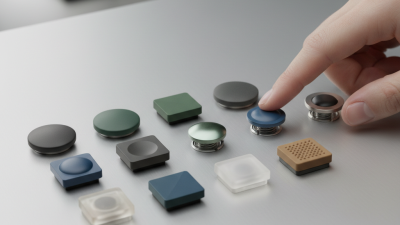
These buttons come in various dimensions, shapes, and styles. A compact design may work well for handheld devices. In contrast, larger buttons could be suitable for industrial applications.
Finding the right balance in size is essential.
Consider the installation area within your design. A button that is too large might obstruct other elements. Conversely, a small button can be hard to navigate. This could frustrate users.
Think about the tactile experience as well. The button's form can impact how users interact with it. Some users prefer a pronounced click, while others might want a softer feel.
Assessing the form factor means understanding the user’s needs. The button's outline can define its usability.
Rounded buttons may be easier to press in certain environments.
Sharp, angular buttons can fit sleek designs but may be less user-friendly. Remember to prototype and test different sizes in your actual design.
Reflecting on these elements can lead to a better final product.
Analyzing Feedback Types: Importance of Sensory Response in User Design
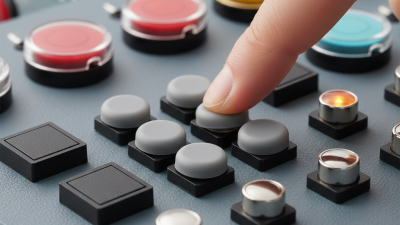
When designing a user interface, the tactile feedback from push buttons plays a crucial role. Users often rely on sensory responses to confirm interactions. A button that offers a clear response can significantly enhance user satisfaction. This response is not just about hearing a click; it’s also about feeling the button's resistance. A poorly designed button can lead to frustration and confusion.
Consider the experience of different users. Some prefer a soft touch, while others seek a firm press. This variation can impact the design choice. Too much resistance can make a button feel unresponsive. Conversely, too little can lead to accidental presses. Balancing these aspects is essential for creating an intuitive interface. User testing becomes invaluable here. Gathering feedback can reveal preferences and pain points that designers may overlook.
It’s also important to reflect on accessibility. A button that works well for one group may not suit another. Features like size and texture can influence usability for individuals with different abilities. This means constant evaluation of design choices is necessary. Designers should be open to iterating their designs based on real-world feedback. A thoughtful approach to tactile feedback can make all the difference in user experience.
 008613968780263

 CONTACT NUMBER
 CONTACT